Trip planner apps compared · Japan
Wanderlog vs TripIt vs Google Maps for a Japan Trip (2026)
Wanderlog, TripIt, Google Maps and Michiplan compared for Japan: which ones order your places, plans around opening hours and train times, and works offline.
Wanderlog, TripIt and Google Maps each do a different job, and for a Japan trip you may well end up using more than one. TripIt turns booking emails into one itinerary. Google Maps finds places and gets you from one to the next. Wanderlog puts your days and your saved places on a shared map. None of the three apps' own pages that we read describes timing a whole day of sightseeing against Japanese train and bus timetables, and Wanderlog's own FAQ says it has no transit directions in Japan at all.
Michiplan is the fourth app in this comparison, and it is ours, so read this with that in mind. Everything said here about Wanderlog, TripIt and Google Maps comes from their own websites and help pages, linked where it is used and checked on 5 November 2026. We have not tested their apps by hand, and where their pages are silent on something, we say so rather than guess.
Key Takeaways
- Wanderlog can reorder up to 15 places in a day and lets friends edit a trip with you, but its FAQ says Google provides it no transit directions for Japan.
- TripIt is built around your bookings. Forward a confirmation email to plans@tripit.com and it lands in your itinerary; its pages say nothing about ordering sightseeing stops.
- Google Maps is the app to have on the day. You can save and share lists, but multi-stop directions top out at 9 stops and do not work for public transit.
- Michiplan decides which place goes on which day and in what order, checks opening hours on your dates and takes ride times from published timetables where they exist. In Tokyo, Kyoto and Osaka most rides are still estimated, and it has no offline app or booking import.
- A sensible split: plan the order in Michiplan or Wanderlog, keep bookings in TripIt, and use Google Maps on the street.
The quick comparison
Each cell below is what the vendor's own pages say or, for Michiplan, what the app does today.
| Wanderlog | TripIt | Google Maps | Michiplan | |
|---|---|---|---|---|
| Best at | A shared plan and map of your trip | Bookings gathered into one itinerary | Finding places, directions on the day | Which place on which day, in what order |
| Puts places in order for you | Yes, up to 15 places in a day ("Optimize route", a Pro feature on its 2024 page) | Not among the features it lists | No: you set the order of up to 9 stops yourself | Yes, the whole trip, up to 16 days |
| Plans around opening hours | Not mentioned on its FAQ or 2024 comparison page | Not among the features it lists | Shows a place's hours; does not order stops by them | Checked by weekday against each date of the trip |
| Train and bus times in Japan | FAQ: no transit directions in Japan | Lists "shows transportation options"; nothing Japan-specific described | Transit directions, one destination at a time | Published timetables where they exist; other rides estimated and marked |
| Hotels | Hotel bookings from your emails or Gmail; add the hotel as a day's first and last stop | Hotel bookings from your emails | Saved as a place | Your hotel, or a suggested area, for each night |
| Imports booking emails | Yes (forward, or connect Gmail) | Yes, its core feature | No | No |
| Plan with friends | Yes, with edit access | Shares plans with others | Shared lists that others can edit | View-only share link |
| Offline | Trip plan in the app; offline maps with Pro | Itinerary offline | Downloaded map areas; no transit directions offline | No offline mode; print, save as PDF or add to a calendar |
| Price | Free; Pro $39.99 a year (2024 page) | Free; Pro $49 a year | Free to install | Free during the beta |
Sources for every cell are in the sections below and listed in full at the end.
Wanderlog: a shared plan, and the Japan gap its FAQ names
Wanderlog is the closest of the three to a full trip planner. You build a plan of places and days on a map, invite tripmates with "Can edit" access, forward booking emails or connect Gmail to pull in flights and hotels, and print the trip from the web app. The FAQ suggests adding your hotel as the first and last stop of each day (Wanderlog FAQ), and says the basic plan and map "will remain free forever, for as many trips as you want to plan."
To order a day, Wanderlog has a feature called Optimize route. Its FAQ says "you can optimize route for up to 15 places within one day," between a start point and an end point you choose (Wanderlog FAQ). Its own comparison with TripIt describes the feature as finding "the quickest route between all your stops for the day, grouping stops that are close together," and lists it under Pro, alongside offline access, unlimited use of its AI assistant and export to Google Maps, at $39.99 a year (Wanderlog vs TripIt, November 2024). That page is two years old, so check the app for today's price.
Another Wanderlog page says the free app keeps your itinerary available offline, while offline maps are a Pro feature (Is there a free trip planner?). Neither the FAQ nor the comparison says the optimizer takes opening hours into account.
Japan is where Wanderlog is most upfront about its limits. Under "No transit directions in Japan?" its FAQ answers: "This is actually a unique issue for Japan – Google's APIs just don't provide us with any information, specifically for Japan." It suggests looking up the transit directions yourself and writing them into the notes. Trains, ferries and buses also have no booking type of their own yet; the FAQ suggests adding the station or terminal as a place and typing the details in (Wanderlog FAQ).
That matters more in Japan than in most countries, because so many days there are spent on trains and buses. A day that looks tidy on a map can still fall apart on a bus that runs every two hours.
Choose Wanderlog if you are planning with friends who all want to edit, you want bookings and places in one shared document, or your Japan trip is mostly by car.
TripIt: your bookings in one place
TripIt starts from the bookings you have already made. "As soon as you book a flight, hotel, car, or other reservation, simply forward it to plans@tripit.com, and we'll automatically add it to your trip" (TripIt, how it works). Its pricing page lists flights, hotel reservations, rental cars, trains, airport shuttles, cruises and travel-agency bookings, "and even events booked on sites like OpenTable, Eventbrite and StubHub" (TripIt pricing).
According to the same page, the free version adds plans from your inbox, syncs them with your calendar, helps you share them, "shows transportation options," finds places near your hotel and includes airport maps. You can also open the itinerary offline. TripIt Pro costs $49 a year after a 30-day free trial. Almost everything Pro adds is about flying: real-time flight alerts, seat and alternate-flight help, check-in and gate reminders, and directions through the airport (TripIt Pro).
What TripIt's pages do not describe is planning the sightseeing itself, such as which day a temple goes on or the order of a day's stops. That is less a flaw than a different job. TripIt keeps track of what you have booked and leaves the shape of each day to you.
Choose TripIt if your trip has many flights, hotels and rail bookings to keep track of, and you will plan the days somewhere else.
Google Maps: the app you will use on the street
Google Maps is free to install (Google Play) and has the most to offer once you are in Japan and walking. Each place shows information such as its business hours (Get started with Google Maps). For planning, Google offers lists and My Maps. You can save places to lists and share a list "to view or edit" (Create a list of places), and Google says a group can add their favorite spots and "use reactions to vote on where to go next" (Google Maps). My Maps, on a computer, gives you up to 10 layers per map (one per day works well), and you can import up to 2,000 rows from a spreadsheet (My Maps layers; My Maps import).
As a trip planner, though, Google Maps stops short of ordering anything for you. Directions with several stops allow up to 9 stops including the destination, you set their order yourself, and "directions to multiple destinations, or waypoints, are not available for public transit" (Get directions). The same page says picking a departure time to plan around transit schedules "only works for routes with one destination," and that not every city has transit directions, since "your local transit agency must add their route info to Google Maps."
Offline, you can download an area of the map, but "when you're offline, transit, bicycling, or walking directions are unavailable," and some countries and regions cannot be downloaded at all (Download areas and navigate offline). On a Japan trip that leans on trains, plan to stay connected.
Use Google Maps on every trip to get around. For planning, it works best once the order of your days is settled.
Michiplan: the order of the days, timed
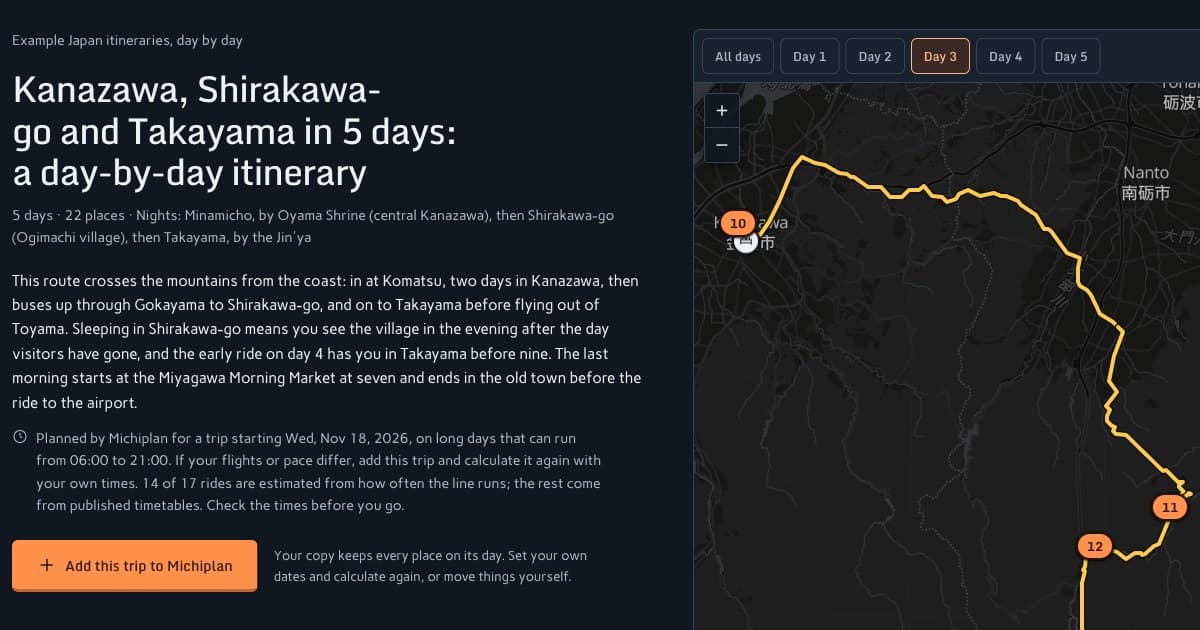
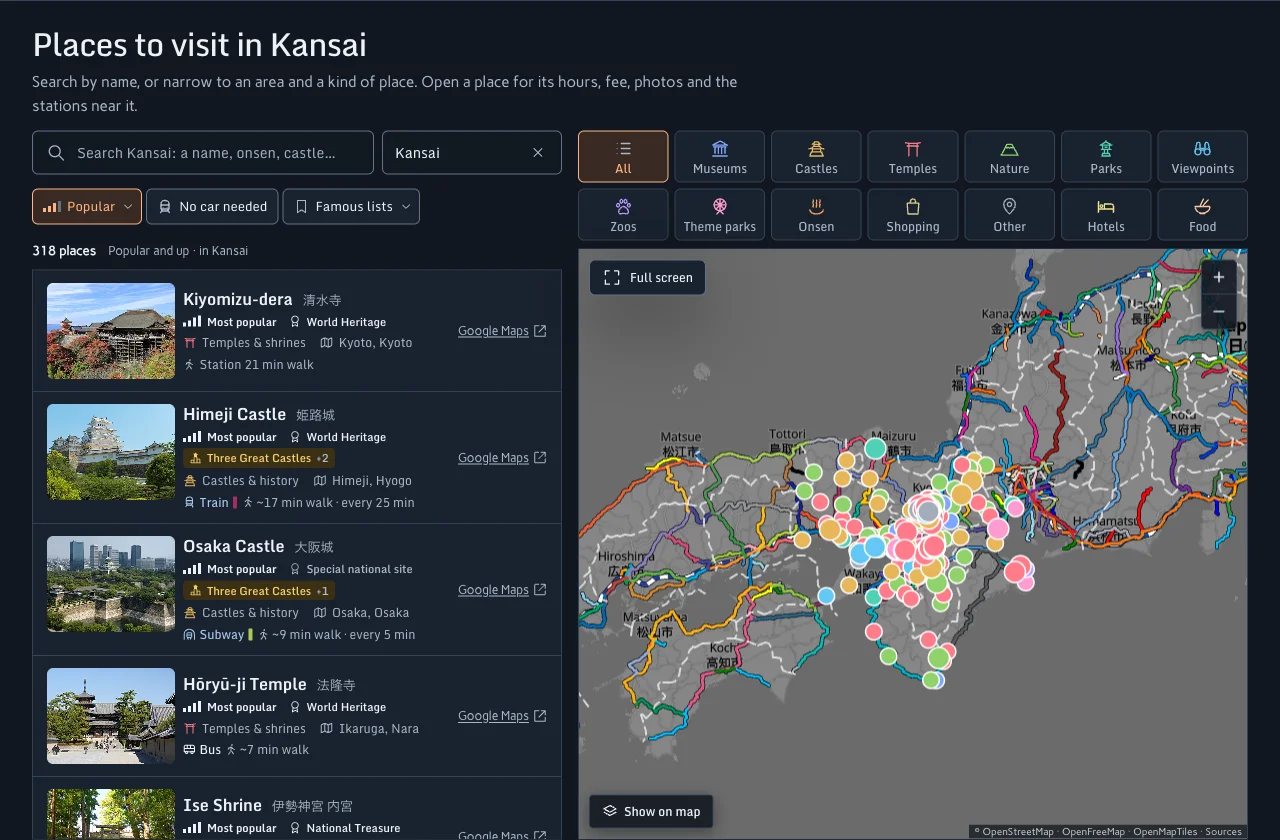
Michiplan is the one app here built for a single question: does this trip work on these dates? You pick the places you want, star each one from 1 to 5 by how much it matters, and enter your dates and hotels. Michiplan then decides which day each place goes on and in what order, with the train, bus, ferry or drive between them, for trips of up to 16 days. A place that does not fit is not dropped quietly; it is listed with the reason, such as being too far to reach that day.
Opening hours, on the dates you travel
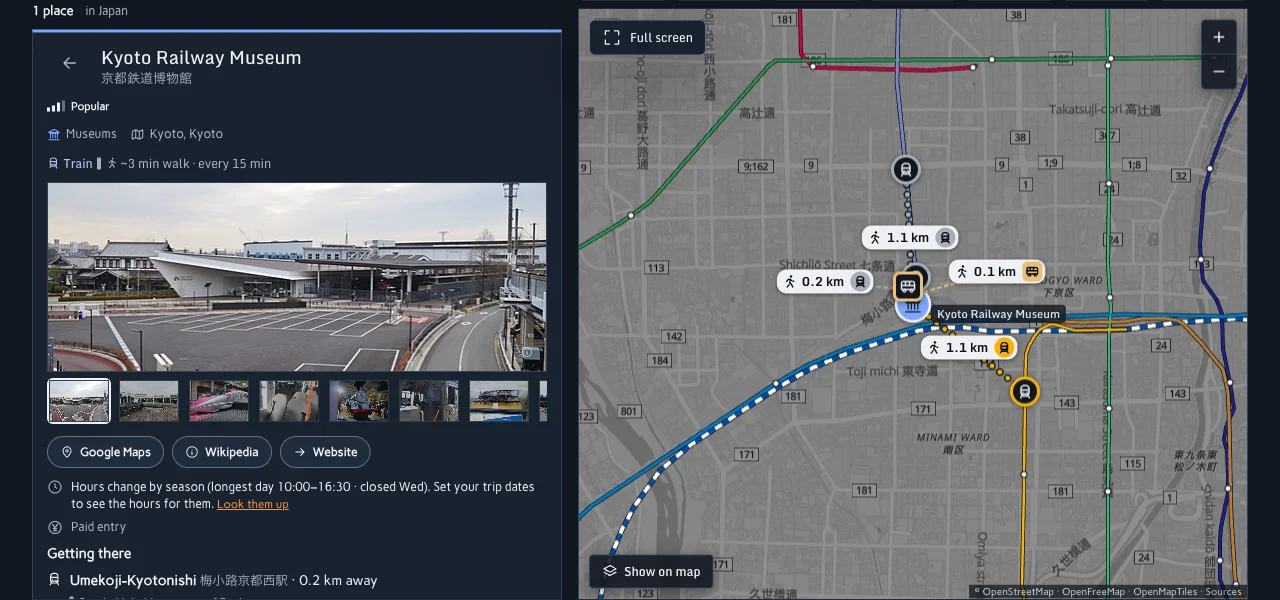
Michiplan only puts a place on a day it is open, as far as its hours are known. It reads a place's opening hours by weekday, including closed days and places that open twice a day, and checks them against the date the plan puts it on. It also knows Japan's national holidays, and uses a place's holiday hours when its listed hours include them. The hours come mostly from OpenStreetMap, so some places have none and some are out of date: the place's page says "No opening hours listed" when it has nothing, and you can edit any place's hours yourself.
Where the ride times come from
Where a line publishes an open timetable, each ride is timed to its actual departures on your dates. Where it does not, Michiplan estimates the ride from how often the line runs, and marks it Estimated. Many big-city lines publish no open timetable yet, so in Tokyo, Kyoto and Osaka most rides are estimated for now. You can type in the times for any line yourself, and our sources page lists every operator whose timetable is used.
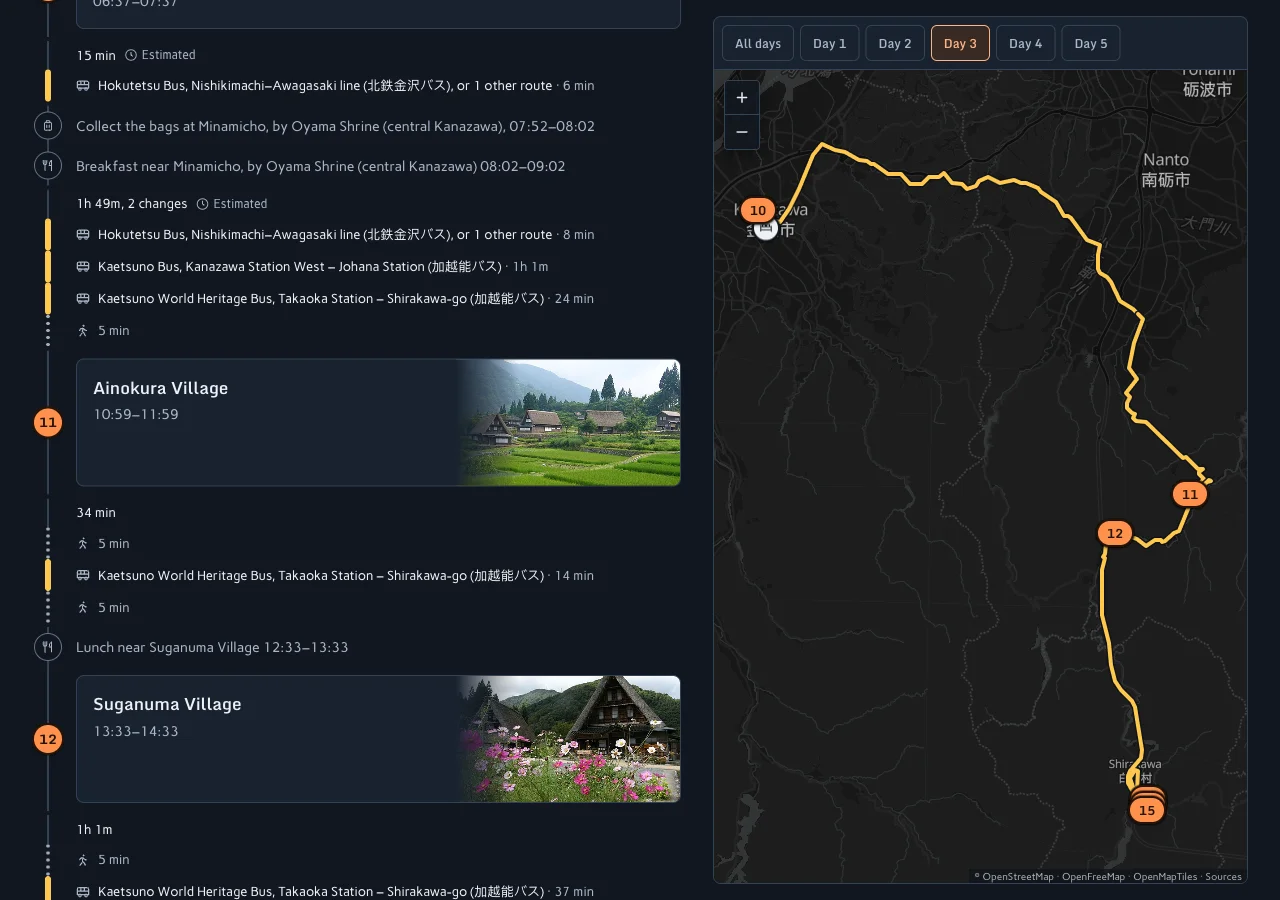
The example above is from a five-day plan through Kanazawa, Shirakawa-go and Takayama. On that rural trip, the itinerary page says 14 of its 17 rides are estimated. Open timetable data in Japan is still patchy, so check those rides before you go.
Nights, bags and pace
You can add your own hotel for each night or take a suggested area. Michiplan plans the days around your flights, how long you want each day to run and where to leave your bags on a day you change hotels, and it adds up the fare of every ride.
What Michiplan does not do
- No booking import. It does not read confirmation emails, and it does not book anything.
- No offline app. It runs in the browser on a phone or laptop. You can print a trip, save it as a PDF or add it to your calendar.
- No editing with friends. A share link is view-only and lasts 30 days.
- No turn-by-turn navigation. Each place opens in Google Maps, and a shared trip or calendar file links each ride to Google Maps directions.
Price: Michiplan is free during the beta. Without an account you can plan one trip and run the planner once. Signed in with Google, you can keep up to 5 trips and run it 30 times a day (see what the beta includes).
Choose Michiplan if you have more places than days and want to see what fits, and in what order, before you book the hotels.
Which app should you use for Japan?
You will probably use more than one, because the apps barely overlap. A practical split:
- Choose places and the order of the days in Michiplan, or in Wanderlog if your group wants to edit together and you are happy to look up train times yourself.
- Keep the bookings in TripIt, or in Wanderlog by forwarding the emails.
- Navigate on the day with Google Maps, and check any ride Michiplan marked Estimated before you rely on it.
If you are still choosing where to go, browse places by region first. For an example of how a trip comes together around gardens and trains, see Japan's Three Great Gardens by train.
Frequently asked questions
Does Wanderlog work in Japan?
Yes, for planning places and days on a map, but its FAQ says it cannot show transit directions in Japan, because Google's APIs do not provide them. Wanderlog suggests looking up the train and bus directions yourself and writing them into the notes (Wanderlog FAQ).
Is Wanderlog free?
According to Wanderlog's FAQ, the basic plan and map are free for as many trips as you like. Route optimization, offline maps and export to Google Maps are part of Wanderlog Pro, which its November 2024 comparison page prices at $39.99 a year (Wanderlog vs TripIt).
Can Google Maps plan a multi-day trip?
Partly. Lists and My Maps can hold a trip's places, with one My Maps layer per day. Google Maps will not decide the order for you, and its directions with several stops do not work for public transit (Get directions).
Does TripIt make an itinerary of things to see?
TripIt builds an itinerary from your bookings, such as flights, hotels, trains, rental cars and events. Its pages do not describe choosing or ordering sightseeing stops (TripIt pricing).
What is a Wanderlog alternative for Japan?
If train and bus times are the reason you are looking, Michiplan takes ride times from published timetables where they exist and marks the rest as estimated, and it checks opening hours against your dates. It lacks Wanderlog's group editing, booking import and offline app. If you are travelling by car, Wanderlog's gap matters much less.
About this comparison
This comparison was written by the Michiplan team, which makes Michiplan. Claims about Wanderlog, TripIt and Google Maps come only from their own websites, help pages and app listing, read on 5 November 2026; we did not test their apps by hand. Prices and features change, so check each app before you rely on it. What we say about Michiplan describes the app on that date, and its data sources are on our sources page. Spotted a mistake? Tell us at hello@michiplan.com. See also our privacy policy and terms.
Sources
Wanderlog, retrieved 2026-11-05:
- Wanderlog FAQ: transit in Japan, Optimize route, offline, collaboration, booking import, printing, export to Google Maps, free plan
- Wanderlog vs TripIt (Wanderlog blog, November 2024): Pro features and price
- Is there a free trip planner? (Wanderlog blog, October 2024): offline itinerary free, offline maps Pro
TripIt, retrieved 2026-11-05:
Google Maps, retrieved 2026-11-05:
- Google Maps Help: Get started with Google Maps, Create a list of places, Get directions and show routes, Download areas and navigate offline
- My Maps Help: Use map layers, Import map features
- Google Maps (lists shared with a group) and its Google Play listing
Michiplan:
- Plans and the sources of its data, checked 2026-11-05
- Screenshots of michiplan.com taken by the Michiplan team on 5 November 2026. Maps © OpenStreetMap contributors, tiles OpenFreeMap and OpenMapTiles; place photos inside the screenshots are from Wikimedia Commons, credited in the app.
See what fits, in what order
Pick the places you want and your dates. Michiplan puts each on a day it is open, in order, with the trains and buses between them, and marks any ride time it had to estimate.
Start planning